
Download AI Sticker Generator – Free AI‑Powered Sticker Design Tool for Windows, macOS, Android & iOS
Overview
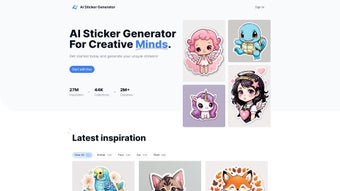
AI Sticker Generator is a cloud‑based graphics design platform that harnesses modern artificial‑intelligence models to turn simple text prompts or pre‑selected themes into professional‑grade stickers in seconds. The service is built for creators of all skill levels—social‑media managers seeking eye‑catching branding elements, small‑business owners who need quick label designs, and hobbyists who love customizing laptops, water bottles, or messaging apps. By operating entirely within a web browser, the tool eliminates the need for heavy installations, allowing you to work from any modern device, whether you run Windows 10/11, macOS Ventura, Linux, Android, or iOS.
Users begin by choosing a category such as “retro”, “minimalist”, “fantasy”, or “tech”, or they can type a custom phrase like “neon cat astronaut”. The AI engine instantly generates a set of high‑resolution concepts that can be refined with a rich set of customization controls—color palettes, font families, border thickness, and background transparency. A built‑in credit system provides five free credits each week, enabling casual experimentation without any upfront cost, while paid credit bundles unlock bulk generation and priority processing.
Security is baked into the platform: all assets are stored on encrypted cloud servers for 30 days, and the download process uses HTTPS to protect data in transit. In short, AI Sticker Generator delivers a fast, secure, and cost‑effective way to create printable or digital stickers without the steep learning curve of traditional design suites.
Key Features and Performance Highlights
- AI‑Driven Art Engine: Generates unique sticker concepts from text or category selections within seconds, leveraging deep‑learning models trained on millions of graphic assets.
- Extensive Inspiration Library: Over 30 curated themes—including Pop Culture, Nature, Gaming, and Business—to spark ideas instantly.
- Advanced Customisation Controls: Real‑time color wheel, font picker, border styles, and transparent background toggles let you fine‑tune every element.
- High‑Resolution Export Options: Download PNG files with alpha channels or scalable SVG vectors for print‑ready quality.
- Flexible Credit‑Based Pricing: Free tier grants five weekly credits; paid bundles (e.g., 50 credits for $9.99) provide unlimited generation and priority queues.
- Cross‑Platform Accessibility: Fully responsive design works on Windows, macOS, Linux, Android, and iOS browsers without plugins.
- Secure Cloud Gallery: Auto‑saved designs are kept encrypted for 30 days, allowing later edits or sharing via public links.
- Batch Generation Mode: Create up to 20 variations from a single prompt with one credit purchase, ideal for A/B testing.
- Community‑Driven Gallery: Browse, like, and remix stickers from other users, fostering collaboration and inspiration.
- Regular Model Updates: Monthly AI model upgrades introduce new styles, color trends, and design templates.
Pros
- Instant generation eliminates long render times, boosting productivity.
- Free weekly credits make the platform accessible to casual creators.
- High‑resolution PNG and SVG outputs are suitable for both digital and print applications.
- Intuitive, browser‑based UI works seamlessly on desktops, tablets, and smartphones.
- Credit system offers transparent, pay‑as‑you‑go pricing without hidden fees.
- Monthly AI updates keep the design library fresh and contemporary.
- Encrypted cloud storage protects assets and simplifies version control.
Cons
- Advanced editing features (layer masks, vector path editing) are limited compared to full‑featured design suites.
- Heavy users may find credit bundles pricey; occasional creators might deplete free credits quickly.
- Internet connection is mandatory; offline work is not supported.
- Export formats are restricted to PNG and SVG; PDF or JPEG are unavailable directly.
- AI output occasionally deviates from strict brand guidelines, requiring manual adjustments.
Installation & Usage Guide
Because AI Sticker Generator is a fully hosted web application, there is no traditional installation process. You simply need a modern browser (Chrome, Firefox, Safari, or Edge) on a supported operating system. Follow these steps to start creating stickers immediately:
- Launch the Service: Navigate to www.aistickergenerator.com. The homepage detects your device and serves an optimized layout.
- Create an Account: Click “Sign Up” and register using an email address, Google, or Apple ID. Account creation is free and links your credit balance to your profile.
- Verify Free Credits: Upon first login you receive five free credits. These refresh every Monday, allowing you to experiment without spending.
- Select a Theme or Enter a Prompt: Use the dropdown menu to pick a pre‑defined category or type a custom description such as “glowing retro cyberpunk badge”. The AI interprets the input and produces 3‑5 design variations per credit.
- Review and Edit: Click any thumbnail to open the inline editor. Adjust colors with the wheel, swap fonts from a curated list, modify border thickness, and toggle background transparency. All changes preview in real time.
- Export Your Design: Once satisfied, press “Download”. Choose PNG for transparent‑background stickers or SVG for infinitely scalable vectors. Files download to your device’s default folder.
- Optional Cloud Save: Click “Save to Gallery” to store the design in your encrypted cloud repository for up to 30 days. You can revisit, edit, or share a public link with teammates.
- Purchase Additional Credits (If Needed): If you run out of free credits, navigate to the “Credits” tab and select a bundle. Payments are accepted via major credit cards, PayPal, Apple Pay, or Google Pay.
Pro Tip: For mobile creators, rotating the device to landscape mode expands the editing canvas and provides easier access to toolbar controls, making detailed adjustments more comfortable.
Compatibility: The application runs on any modern operating system with a web browser, including Windows 10/11, macOS Ventura and later, popular Linux distributions, Android 8.0+, and iOS 13+. No additional plugins or extensions are required.
Frequently Asked Questions
How many free credits do I receive each week?
New users are granted 5 free credits every Monday. Each credit allows the generation of one sticker set (3‑5 variations), so you can create up to five stickers without spending.
Can the stickers be used for commercial projects?
Yes. Once you download a sticker, you own a royalty‑free license to use it commercially, whether for merchandise, marketing collateral, or resale, provided you adhere to the platform’s terms of service.
Is there a downloadable desktop application?
Currently AI Sticker Generator is only available as a responsive web app. This ensures you always have the latest AI models and feature updates without manual installations.
What payment methods are accepted for credit purchases?
We accept Visa, MasterCard, American Express, PayPal, Apple Pay, and Google Pay. All transactions are processed securely over HTTPS.
How long are my stickers retained in the cloud gallery?
Generated stickers are stored encrypted for 30 days. After this period they are automatically deleted to protect your privacy.
Conclusion & Call to Action
AI Sticker Generator delivers a compelling blend of speed, security, and creative flexibility that makes it an ideal solution for anyone needing custom stickers without the overhead of professional design software. Its AI‑driven engine removes artistic barriers, while the credit‑based pricing ensures you only pay for the output you actually need. The platform’s cross‑device compatibility, high‑resolution export options, and secure cloud storage further enhance its appeal for marketers, entrepreneurs, and hobbyists alike. Although the reliance on an internet connection and the limited depth of advanced editing tools may be a drawback for power users, the overall value proposition—free weekly credits, instant generation, and regular feature updates—far outweighs these minor inconveniences for most creators.
Ready to transform your ideas into vibrant, printable stickers? Download AI Sticker Generator now, claim your free weekly credits, and start designing eye‑catching stickers that stand out on social media, product packaging, or personal projects. Experience fast, affordable, AI‑powered design today.



.png)



